Turn Your Territory Into Buyers, Tenants, And Requirements.
Scayled is the territory intelligence platform that helps industrial and logistics brokerage teams lease and sell listings faster, win requirements earlier, and own the submarkets they work.


 + more
The Unfair Advantage Is Seeing Every Move First.
Own your submarket. Every occupier mapped, every expansion, contraction, and relocation signal surfacing before the requirement hits the market.
Toggle between Signal and Status on the map. Signal shows which occupiers are expanding, contracting, or relocating right now. Status shows who you have already reached and who is still open to approach.
Chicago map used for illustrative purposes.
Map the whole submarket
Every occupier in your patch on one live map, down to the unit. Not a stale list, the real board.
Catch the signal first
Expansion, contraction, and relocation signals surface automatically, scored and dated, so requirements reach you before they go public.
Win before the market
Your team is already in the conversation while everyone else is still reacting to a listing.
How Your Territory Drives New Business.
Your mapped submarket works in the background. Expansion, contraction, and relocation signals surface automatically, then become outreach while the requirement is still private.
ImpacTex Textile Recycling
12 Olive Road, Penrose
Textile recycler plans major scaling and automation, signalling imminent capacity needs.
Why: Stated goals to expand across NZ and internationally, with 550+ tonnes of textile waste diverted by late 2025.
Takeaway: Engage leadership to align new facility requirements with available industrial space.
Action window: 6-12 months
Echo Tech Ltd
5 Southpark Place, Penrose
Secures capital for national expansion and new facility rollouts.
Why: Strategic investment from Altered Capital to fund expansion; targets 5x e-waste volume within four years.
Takeaway: Contact Echo Tech to explore requirements for new or expanded industrial facilities.
Action window: 6-18 months
How Scayled Turns Each Listing Into A Deal System.
Apart from the weekly signals, Scayled gives your team an automated system that drives new buyers and tenants for their listings. Every good broker knows you speak to the neighbours first, and the best buyers and tenants never call you. Scayled does both in five minutes. See the flow below.
Intentional Emails, Built To Convert.
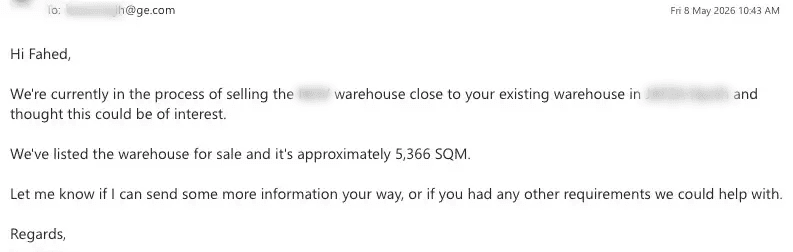
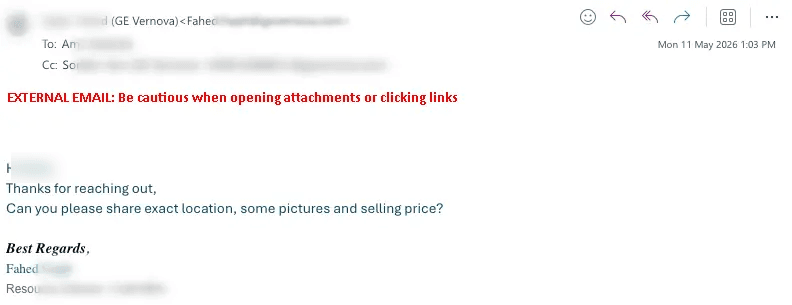
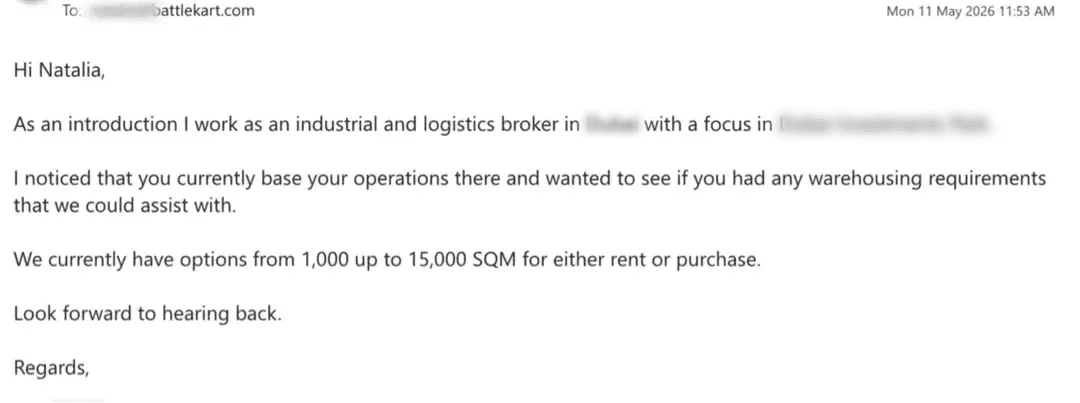
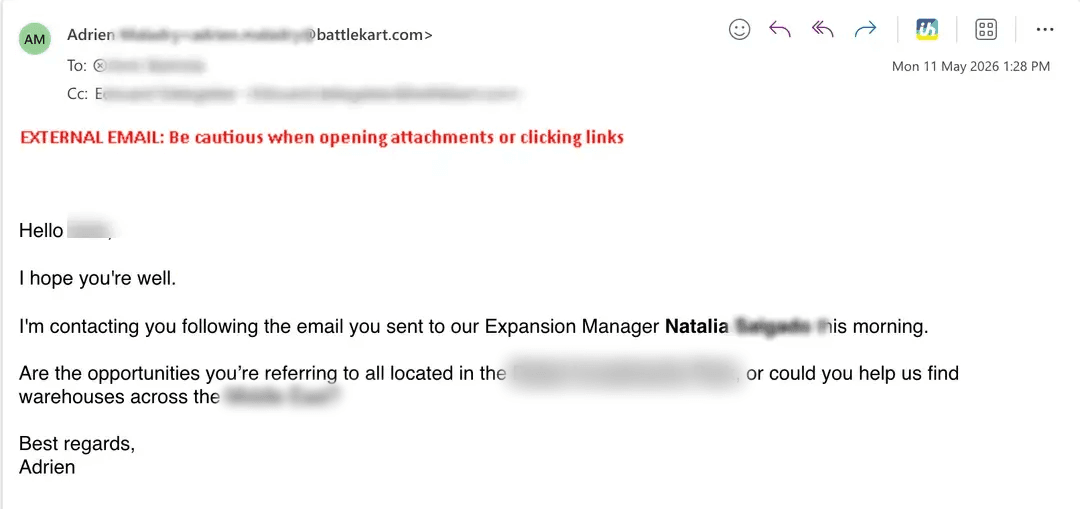
Every email references your listing, the occupier's proximity, and why it matters to them. Not a template blast. A relevant message that gets replies.
Real outreaches. Real replies.
Names redacted, addresses kept.
We've Been Promised Tools That Work. They Don't.
If we're being honest, we both know that plenty of platforms have promised to change how industrial brokers do deals. Most of them were built by people who have never canvassed a neighbour, never walked a tenant through a warehouse, and never had to protect their reputation in a market where everyone knows everyone.
I've been an industrial broker for ten years. The only people who truly understand our workflow are other brokers. We don't blast hundreds of emails. We work in small markets where every conversation matters and every name we put in front of a landlord reflects on us.
Scayled was built around that principle. Every feature exists because I needed it on the ground, not because it looked good in a pitch deck.
One Closed Deal Pays For Years Of Scayled.
Whether you are a solo broker or an agency team, Scayled turns your territory into a deal engine that surfaces requirements before the market reacts.
Solo Broker
For individual brokers running their own territory. Full access to the occupier intelligence layer, movement signals, and outreach tools.
Full platform access, no per-lead fees
- 8 scans / month (listing + target)
- Patch intelligence signals
- Occupier database with live records
- Outreach wizard with inbox send
- Decision-maker contact reveals
- Mobile catcher for field contacts
- CSV export and priority support
Agency Territory Intelligence
For broker teams monitoring submarkets. Territory setup, weekly signal refresh, dedicated onboarding, and intelligence review included.
Per submarket setup
- 5 broker seats included (8 scans each)
- Full submarket Territory Intelligence
- Agency territory monitoring
- Decision-maker contacts on demand
- Dedicated onboarding per broker
- Weekly intelligence review
Setup includes territory config, occupier mapping, signal activation, contact enrichment, and your first live intelligence view.
The Math Every Broker Runs.
Fees from the extra deals against the full year-one cost of Scayled. Run it on your own numbers.
Keep it conservative.
One average fee covers 16+ years of Scayled.
We control access to Scayled. Not as a sales tactic, but to protect the brokers already on the platform. We limit the number of brokers per submarket so your requirements stay yours.
When you're on Scayled, we want you making as much money from it as possible. That only works if we keep the competition off your patch.
·+ moreWhat Your Setup Includes.
Your setup builds the first monitored territory. In the first week, Scayled configures the area, maps the occupiers, activates movement signals, enriches contacts, and gives your team a live intelligence view.
Territory configuration
We define the submarket boundaries, listing locations, asset cluster, or monitoring radius for your first territory. You tell us the area. We build the intelligence layer around it.
Occupier mapping
Relevant occupiers within range are mapped, verified, and categorized by industry, location, and contactability. This is not a static directory export. It is built around the territory you want to monitor.
Movement signal activation
Expansion, contraction, and relocation monitoring begins across mapped occupiers. Signals are scored by confidence, recency, and actionability so your team can focus on what matters.
Decision-maker enrichment
Decision-maker contacts are enriched where available, including role context and available email, phone, or LinkedIn data. Contacts are resolved around the occupiers in your territory, not pulled from a stale list.
First intelligence view
Your territory goes live with occupier records, movement signals, contact paths, and action-ready next steps in your dashboard. Every scan and territory update compounds from here.
Onboarding
We walk your team through the territory layout, signal interpretation, decision-maker reveal flow, outreach setup, and team configuration so brokers or asset managers know how to use what we built.
Stop Waiting For Requirements. Start Generating Them.
Every scan compounds. More occupiers, more signals, more conversations your team can act on today.
Common Questions.
What is Scayled?
Scayled is a territory intelligence system for industrial and logistics brokers. You scan listings, map every neighbouring occupier, surface verified decision-makers, and send personalised outreach from your own inbox. Every scan compounds into a live occupier database and signals layer that monitors your market continuously.
How is this different from CoStar or Apollo?
CoStar sells static property data. Apollo sells generic contact lists. Scayled maps real occupiers around your specific listings, verifies the decision-maker at scan time, and feeds every result into a compounding intelligence layer that detects expansion, contraction, and relocation signals across your territory. The data is live, location-specific, and built from your actual deal flow.
How accurate is the contact data?
Verified through multiple sources at scan time, not pulled from a stale database. Bounce rates run under 2% in production. If a reveal is wrong, we re-reveal it free.
Will my emails land in spam?
Each email sends from your own Outlook or Gmail, not from our servers. Your domain reputation is yours. We never send on your behalf.
Is sending these emails compliant with CAN-SPAM?
Yes when sent correctly. Every email is B2B, identifies you and your business, references a legitimate business reason (a real listing nearby), and includes a clear opt-out. Scayled drafts the email and sends from your own inbox so consent and identification rules are met. Don't send anything that looks like bulk marketing without a business pretext, and you're inside the line.
What is Territory Intelligence?
Every occupier from every scan feeds a live intelligence layer. Scayled monitors expansion signals, hiring surges, capital raises, lease expiry risk, and relocation indicators across your territory. You see movement before the market reacts. Included with every paid plan.
Can I cancel anytime?
Yes. Monthly billing, no lock-in contracts. Solo Broker has no setup fee, and the Agency setup is a one-time cost per submarket. Cancel from your dashboard whenever you like.